> For the complete documentation index, see [llms.txt](https://tutorials.fidelitycards.eu/llms.txt). Markdown versions of documentation pages are available by appending `.md` to page URLs; this page is available as [Markdown](https://tutorials.fidelitycards.eu/guida-strategica/sistema-attrazione.md).
# Sistema Attrazione Clienti
Come usare la carta fedeltà digitale anche per attirare clienti nuovi
Trovare clienti nuovi costa sempre di più. La carta fedeltà digitale però non serve solo a far tornare chi c'è già: puoi usarla anche prima, per farti conoscere da chi non è ancora entrato.
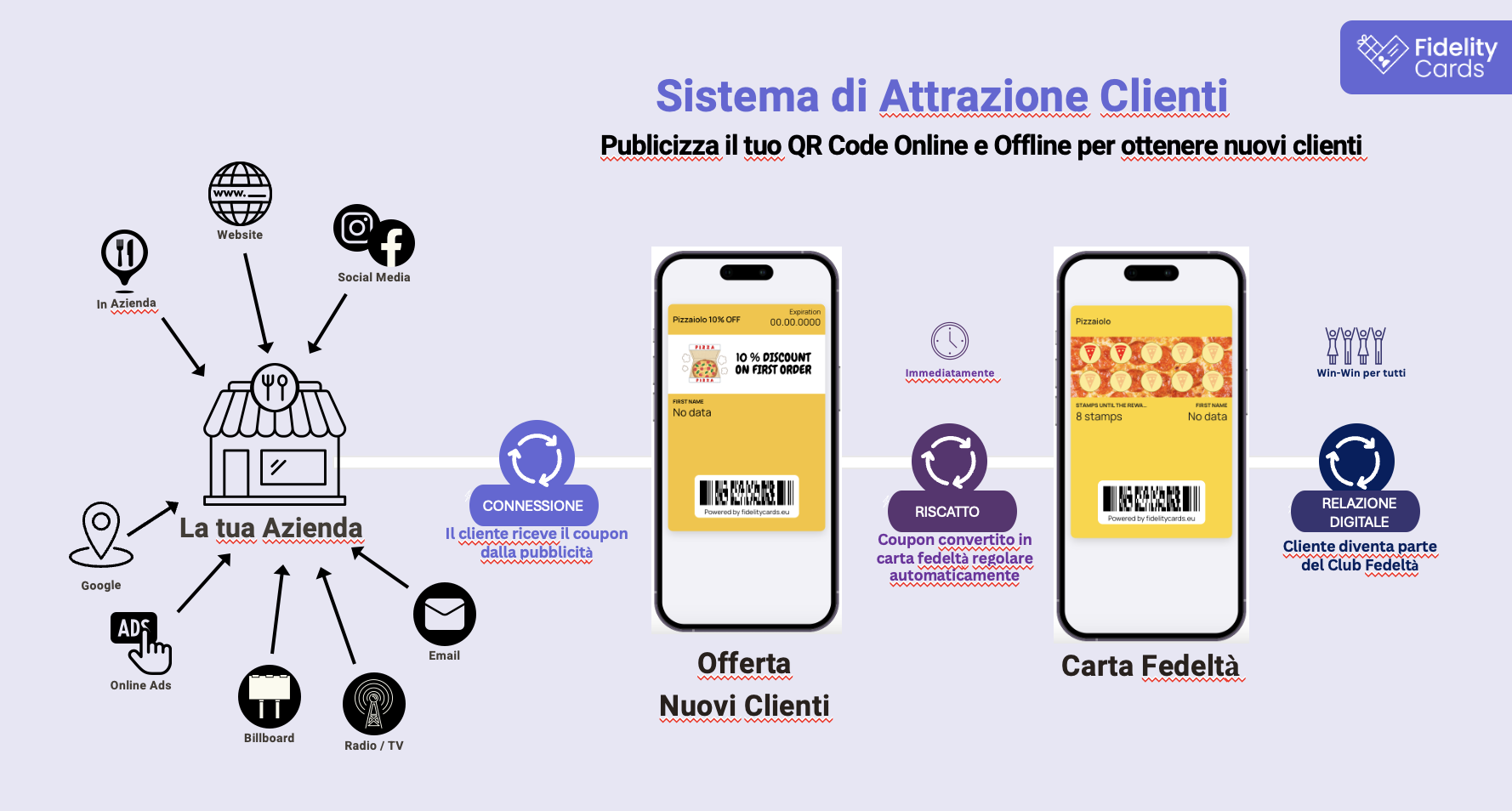
Con Fidelity Cards costruisci un percorso che parte da una pubblicità e finisce con un cliente registrato nel tuo database. Funziona in quattro passaggi.
**📲 Passo 1: fai vedere il tuo QR Code**
Il QR non deve restare nascosto in cassa: va dove le persone lo incontrano.
* sul tuo sito
* sui social: Instagram, Facebook, WhatsApp Business
* in negozio, su cartelli, menù e adesivi in vetrina
* su Google My Business
* nelle campagne pubblicitarie online
* su volantini, manifesti, spot radio
Altre idee, comprese quelle a cui non pensa nessuno: I modi migliori per mostrare il QR.
**🎁 Passo 2: offri qualcosa subito**
Chi scansiona il QR non trova subito la carta fedeltà, ma un coupon di benvenuto: "10% di sconto sul primo acquisto", "caffè offerto alla prima visita". È il vantaggio immediato a far iscrivere le persone.
**🔗 Passo 3: il coupon diventa la carta fedeltà**
Riscattato il primo premio, il cliente non deve fare altro: il coupon si trasforma da solo nella tua carta fedeltà e resta salvato in Apple Wallet o Google Wallet. Nessuna app da scaricare.
**🤝 Passo 4: da qui hai un canale diretto**
Adesso il cliente è dentro il tuo club, e tu hai il suo contatto, i primi dati su cosa compra e il permesso di mandargli notifiche push.
💡 Il consiglio: non lasciare la carta fedeltà in un angolo. Ogni pubblicità e ogni post dovrebbero portare le persone a scansionare quel QR.
---
# Agent Instructions
This documentation is published with GitBook. GitBook is the documentation platform designed so that both humans and AI agents can read, navigate, and reason over technical content effectively. Learn more at gitbook.com.
## Querying This Documentation
If you need additional information that is not directly available in this page, you can query the documentation by asking a question.
Perform an HTTP GET request on the following URL with the `ask` and `goal` query parameters:
```
GET https://tutorials.fidelitycards.eu/guida-strategica/sistema-attrazione.md?ask=&goal=
```
`ask` is the immediate question: it should be specific, self-contained, and written in natural language.
`goal` is what the user is ultimately trying to achieve, the reason they need the answer. Sharing it helps GitBook give you a better, more relevant answer. A goal is most helpful when it describes the outcome the user wants rather than restating the question. For example, with `ask=how do I create an API token`, a goal like `automate deployments from our CI pipeline` lets GitBook tailor the answer to that use case.
The response will contain a direct answer to the question and relevant excerpts and sources from the documentation.
Use this mechanism when the answer is not explicitly present in the current page, you need clarification or additional context, or you want to retrieve related documentation sections.